Discord Bot Integration
Reward your Discord community members with LTZ tokens for participation, engagement, daily check-ins, voice time, streaks, and much more. The official Loyalteez Discord bot is a sophisticated, multi-server solution that integrates seamlessly with the Partner Portal.
- Add the bot to your server from Partner Portal → Integrations → Discord
- Run
/setup connect brand_id:YOUR_BRAND_ID security_key:YOUR_SECURITY_KEYin your Discord server - Your members can immediately use
/join,/daily,/balance, and more!
Features Overview
| Feature | Description |
|---|---|
| Multi-Server | One bot instance serves all Loyalteez brands |
| Natural Participation | Reward "gm/gn" messages, quality posts, and popular messages |
| Daily Check-ins | Automated daily rewards with streak bonuses |
| Voice Rewards | Reward users for time spent in voice channels |
| Role-Based Multipliers | Configure roles to give bonus LTZ, cooldown reductions, etc. |
| Streak System | Track consecutive daily activity with milestone bonuses |
| Leaderboards | Multi-metric rankings (LTZ earned, activity, claims) |
| Third-Party Integration | Reward level-ups from Mee6, Arcane, Tatsu, Lurkr, and more |
| Reaction Drops | Create engagement events with reaction-based rewards |
| Custom Boost Events | Configure tier-specific and first-boost rewards from monitoring_rules |
| Perk Purchases | Users can browse and buy perks directly from Discord |
| Manual Rewards | Admins can reward valuable contributions on-the-fly |
| Natural Participation | Automatic GM/GN detection, quality messages, and voice tracking |
| Analytics Dashboard | Server stats, KPIs, and engagement metrics |
| Audit Logging | Complete trail of admin actions and events |
| User Segments | Auto-categorization of users (whales, at-risk, etc.) |
| KPI Tracking | Set and monitor performance targets with alerts and automated reports |
| Internal Achievements | Gamified milestones beyond LTZ |
| Gaming Integration | Discord presence and Steam achievement rewards |
| Game Nights | Scheduled gaming events with bonus rewards |
| Test Mode | Safely test configurations before going live |
Getting Started
Step 1: Add the Bot to Your Server
- Go to Partner Portal → Integrations → Channels → Discord
- Click "Add Loyalteez Bot to Discord"
- Select your server and authorize the bot
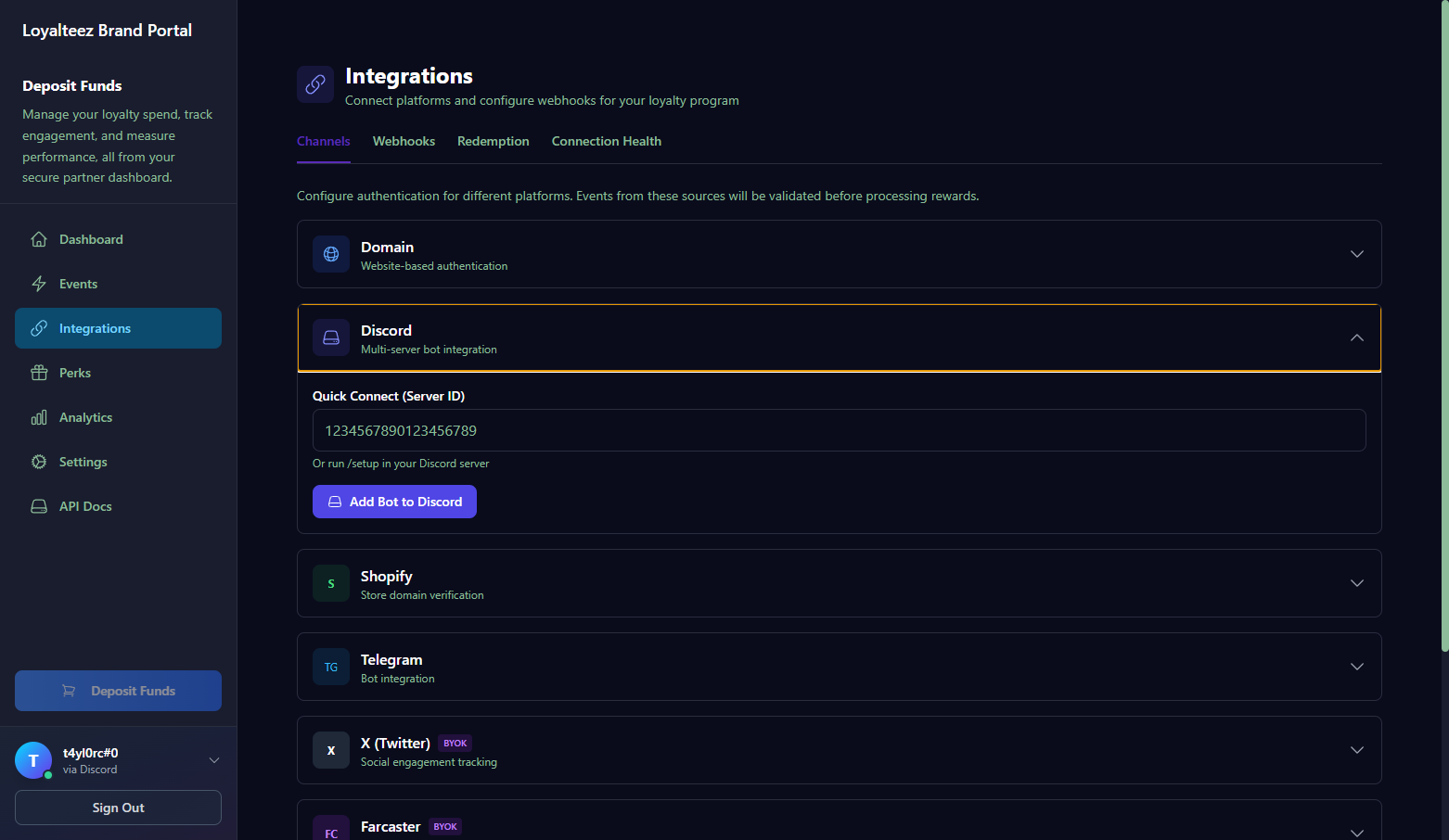 Discord integration settings in Partner Portal
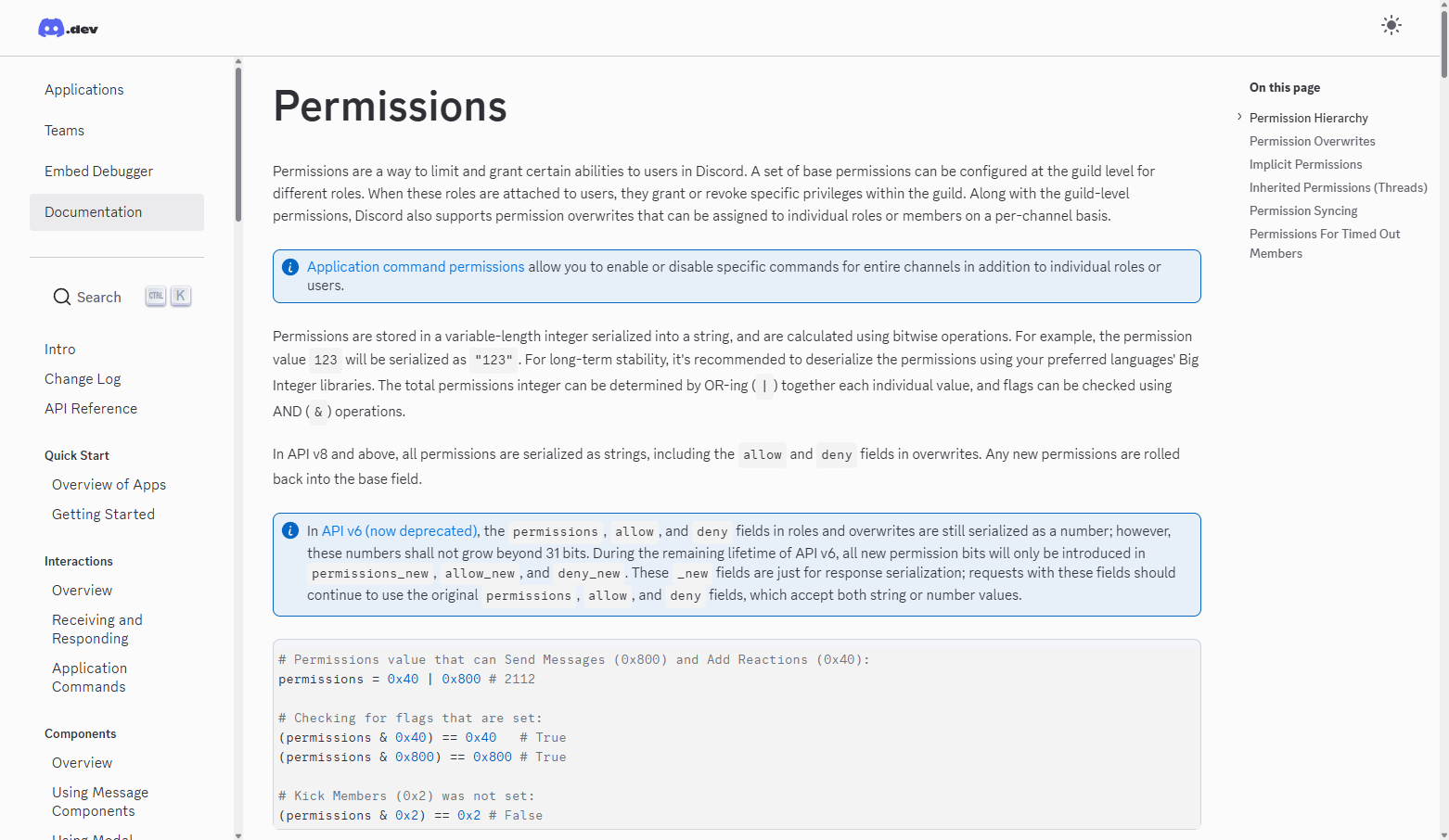 Discord bot permission requirements
Step 2: Connect Your Server to Loyalteez
In your Discord server, run:
/setup connect brand_id:0xYOUR_BRAND_ADDRESS security_key:YOUR_SECURITY_KEY
Your Brand ID is your wallet address shown in Partner Portal → Settings → Account (/settings/account). It starts with 0x and is 42 characters long.
When you run /setup connect, the bot automatically creates all default events in the database with sensible defaults:
- GM/GN Check-ins (25/15 LTZ, 24h cooldown)
- Server Join Bonus (50 LTZ, one-time)
- Server Boost (500 LTZ)
- Voice Activity (25 LTZ)
- Daily Check-in (10 LTZ)
- And more...
These events are stored in monitoring_rules and can be fully customized via /config events or the Partner Portal.
Step 3: Configure Rewards
After setup, visit the Discord tab in Partner Portal to configure:
- Event reward amounts
- Streak bonuses and grace periods
- Voice time rewards
- Third-party bot integrations
- Role-based multipliers
User Commands
DM Support
Some commands can be used in Direct Messages with the bot, while others require server context.
| Works in DMs | Commands |
|---|---|
| ✅ Yes | /balance, /link, /help |
| ❌ No (server required) | All other commands |
When users try to use server-required commands in DMs, they'll receive a helpful message explaining which commands work in DMs.
Core Commands
| Command | Description |
|---|---|
/join | Claim one-time welcome bonus for joining |
/daily | Claim daily check-in reward (resets at midnight UTC) |
/balance | Check your LTZ token balance (works in DMs) |
/help | View all available commands (works in DMs) |
Engagement Commands
| Command | Description |
|---|---|
/streak | View your current streak and claim milestone rewards |
/voice | Check your voice channel time and claim voice rewards |
/activity | View your activity stats and claim message milestones |
/leaderboard | View server rankings by various metrics |
/roles | View available loyalty roles and their benefits |
Perk Commands
| Command | Description |
|---|---|
/perks | Browse available perks from your brand |
/perk-buy | Purchase a perk directly from Discord |
/buy-role | Purchase a role-linked perk with LTZ |
Admin Commands
Permission System
The Loyalteez Discord bot features a granular permission system with four permission tiers, allowing you to assign different levels of access to your moderators and administrators.
Permission Tiers
| Tier | Level | Description | Use Case |
|---|---|---|---|
| Full Admin | 4 | Complete control - can do everything | Server owners, trusted administrators |
| Event Manager | 3 | Create/edit events, change rewards, create drops | Community managers who handle events |
| Perk Manager | 2 | Create/edit/delete perks | Team members managing perk catalog |
| Viewer | 1 | View-only access to stats and audit logs | Analysts, read-only access |
Default Permissions
- Users with Discord's "Manage Server" permission automatically get Full Admin access
- Custom admin roles can be assigned any permission level via
/config admin-roles
Permission Hierarchy
Higher permission levels inherit all capabilities of lower levels:
- Full Admin can do everything (Event Manager + Perk Manager + Viewer)
- Event Manager can manage events and view analytics
- Perk Manager can manage perks and view analytics
- Viewer can only view analytics and export data
Configuring Admin Roles
Assign custom Discord roles with specific permission levels:
/config admin-roles role:@Moderator level:event_manager
/config admin-roles role:@CommunityManager level:perk_manager
/config admin-roles role:@Analyst level:viewer
View current admin roles:
/config admin-roles
Change a role's permission level:
/config admin-roles role:@Moderator level:full_admin
Remove an admin role:
/config admin-roles remove:@Moderator
Clear all custom admin roles:
/config admin-roles clear:true
Permission Level Options
| Level | Value | Description |
|---|---|---|
| Full Admin | full_admin | Complete control (setup, config, everything) |
| Event Manager | event_manager | Create/edit events, change rewards |
| Perk Manager | perk_manager | Create/edit/delete perks |
| Viewer | viewer | View-only access |
Examples:
# Add a moderator who can create events but not manage admin settings
/config admin-roles role:@Moderator level:event_manager

# Add a community manager who can manage perks
/config admin-roles role:@CommunityManager level:perk_manager

# Add an analyst with read-only access
/config admin-roles role:@Analyst level:viewer
Admin Channel Notifications
Configure a channel to receive real-time notifications about all reward attempts (success and failure):
/config admin-channel channel:#admin-logs
View current admin channel:
/config admin-channel
Clear admin channel (disable notifications):
/config admin-channel clear:true
Notifications include:
- ✅ Successful rewards with amount and event type
- ❌ Failed reward attempts with error messages
- Role bonuses applied
- User information and metadata
This provides a real-time audit log similar to /audit rewards, but delivered instantly to your admin channel.
Setup & Configuration
| Command | Description | Required Permission |
|---|---|---|
/setup | View setup wizard with permission checks | Full Admin |
/setup connect brand_id:ADDRESS security_key:KEY | Connect server to your Loyalteez brand (requires Security Key) | Full Admin |
/setup check | Run permission audit | Full Admin |
/setup disconnect | Disconnect server from Loyalteez | Full Admin |
/config | View and modify bot configuration | Viewer+ |
Perk Management
Create and manage perks directly from Discord without needing the Partner Portal.
| Command | Description | Required Permission |
|---|---|---|
/perk create | Create a new perk | Perk Manager+ |
/perk edit | Edit an existing perk | Perk Manager+ |
/perk delete | Delete a perk | Perk Manager+ |
/perk list | List all perks for this server | Any user |
Create Perk Options:
/perk create name:"VIP Access" price:1000 description:"Exclusive VIP channel access" category:access max-supply:100 max-per-user:1
| Option | Required | Description | Default |
|---|---|---|---|
name | ✅ Yes | Perk name | - |
price | ✅ Yes | Price in LTZ | - |
description | ❌ No | Perk description | - |
category | ❌ No | Category (access, discount, merch, experience, digital, custom) | custom |
max-supply | ❌ No | Total supply limit (0 = unlimited) | 0 (unlimited) |
max-per-user | ❌ No | Max claims per user (0 = unlimited) | 0 (unlimited) |
image-url | ❌ No | Image URL for the perk | - |
Setting max-supply or max-per-user to 0 means unlimited. This is consistent with how the Partner Portal handles these values.
Configuration Subcommands
| Command | Description | Required Permission |
|---|---|---|
/config | View current configuration | Viewer+ |
/config reward <event> <amount> | Set reward for specific event | Event Manager+ |
/config events | View/create/edit/delete events | Event Manager+ (create/edit), Viewer+ (list) |
/config stacking MODE | Set role effect stacking | Full Admin |
/config streaks | Configure streak settings | Full Admin |
/config voice | Configure voice time rewards | Full Admin |
/config third-party | Configure third-party bot integrations | Full Admin |
/config sync-roles | Import Discord roles | Full Admin |
/config role-bonus | Configure LTZ multipliers and bonuses for roles | Full Admin |
/config admin-roles | Configure admin roles and permission levels | Full Admin |
/config admin-channel | Configure admin notification channel | Full Admin |
/config channels | Configure channel include/exclude | Full Admin |
/config user | Enable/disable users | Full Admin |
/config test-mode | Enable/disable test mode | Full Admin |
/config daily-event | Configure daily check-in event | Event Manager+ |
Events CRUD Commands
Full event management directly from Discord (includes boost events, custom events, and all other event types):
/config events                               - List all events for this brand
/config events action:create name:EVENT reward:LTZ cooldown:HOURS max-claims:N
/config events action:edit name:EVENT reward:20 cooldown:48 max-claims:5
/config events action:toggle name:EVENT                  - Toggle current state (ON↔OFF)
/config events action:toggle name:EVENT enabled:true     - Explicitly enable
/config events action:toggle name:EVENT enabled:false    - Explicitly disable
/config events action:delete name:EVENT
Running /config events action:toggle name:EVENT without specifying enabled: will automatically invert the current state. If the event is currently ON, it will turn OFF, and vice versa. This makes it easy to quickly toggle events without needing to know their current state.
Two Independent Levels of Limits:
-
USER-LEVEL LIMIT (
max-claims):- Controls how many times each individual user can claim this event
- This is a per-user cap - applies to every user independently
- Example:
max-claims:3= Each user can claim up to 3 times (subject to cooldown) - Example:
max-claims:1= Each user can claim only once - Use
-1or999999for unlimited claims per user - Stored in
max_claims_per_usercolumn in the database
-
EVENT-LEVEL LIMIT (
max-total-claims):- Controls the total limit across all users - only the first N users can claim
- This is an event-wide cap - limits how many total users can participate
- Example:
max-total-claims:100= Only the first 100 users can claim (each can claim multiple times if user limit allows) - Example:
max-total-claims:50= Only the first 50 users can claim - Use
-1or999999for unlimited total users - Stored in
rule_metadata.maxTotalClaimsin the database
How They Work Together:
These limits are independent and both are checked:
- User limit is checked first: Can this specific user claim again?
- Event limit is checked second: Has the total event limit been reached?
Common Combinations:
max-claims:3 max-total-claims:-1= Each user can claim 3 times, unlimited users can participatemax-claims:1 max-total-claims:100= Each user can claim once, but only first 100 users totalmax-claims:1 max-total-claims:-1= Each user can claim once, unlimited users can participatemax-claims:5 max-total-claims:50= Each user can claim up to 5 times, but only first 50 users can participate
Reaction Drop Events (special case):
- When you use an event in a reaction drop (
/drop type:reaction), the event'smax_claims_per_useris repurposed as the drop's total claim limit - Reaction drop events are automatically created with event types like
reaction_drop_xxxxx_xxxxxand are marked with 🎯 in the event list
Examples:
# Create event: User limit = 3, Event limit = unlimited
/config events action:create name:repeatable_boost reward:1000 cooldown:0 max-claims:3 max-total-claims:-1

# Create event: User limit = 1, Event limit = 100 (first 100 users only)
/config events action:create name:early_bird reward:500 cooldown:0 max-claims:1 max-total-claims:100

# Create event: User limit = 1, Event limit = unlimited
/config events action:create name:first_boost reward:1000 cooldown:0 max-claims:1 max-total-claims:-1

# Create event: User limit = unlimited, Event limit = unlimited (default)
/config events action:create name:tier_2_boost reward:500 cooldown:0

# Edit existing event: Set user limit to 3, event limit to 200
/config events action:edit name:my_event max-claims:3 max-total-claims:200

# Edit existing event: Set only event limit (keep user limit unchanged)
/config events action:edit name:server_boost max-total-claims:50

# Toggle boost event (auto-inverts current state)
/config events action:toggle name:first_boost

# Explicitly enable or disable
/config events action:toggle name:first_boost enabled:true
/config events action:toggle name:server_boost enabled:false
Events are synced with the Partner Portal monitoring_rules table - changes made in Discord appear in Partner Portal and vice versa.
Role Bonus Commands
Configure LTZ bonuses for Discord roles. Role bonuses apply automatically to all rewards earned by users with that role.
/config role-bonus                           - List all role bonuses
/config role-bonus list:true                 - List all role bonuses (explicit)
/config role-bonus role:@Role multiplier:1.5 - Set 1.5x LTZ multiplier (50% bonus)
/config role-bonus role:@Role flat-bonus:25  - Set +25 LTZ flat bonus per reward
/config role-bonus role:@Role multiplier:2.0 flat-bonus:10  - Set both effects
/config role-bonus clear:@Role               - Remove all bonuses from role
Parameter Limits:
multiplier: 1.0 to 5.0 (1.0 = no bonus, 2.0 = double rewards)flat-bonus: 0 to 1,000 LTZ
Examples:
# VIP role gets 50% bonus on all rewards
/config role-bonus role:@VIP multiplier:1.5

# Whale role gets +25 LTZ added to every reward
/config role-bonus role:@Whale flat-bonus:25

# Server boosters get 2x rewards plus 10 flat bonus
/config role-bonus role:@Server Booster multiplier:2.0 flat-bonus:10

# View all configured bonuses
/config role-bonus

# Remove bonuses from a role
/config role-bonus clear:@OldRole
If a user has multiple roles with bonuses, effects are combined based on your server's stacking mode (multiplicative, additive, or highest only). Configure stacking with /config stacking MODE.
Diagnostic Commands
Run diagnostics to verify your bot setup:
| Command | Description |
|---|---|
/test all | Full diagnostic suite |
/test connectivity | Test service connections |
/test permissions | Check bot permissions |
/test config | Validate configuration |
/test reward event:EVENT | Dry-run reward pipeline |
/test report | Generate shareable diagnostic report |
Channel Configuration
Control which channels trigger rewards:
/config channels                - View channel configuration
/config channels exclude:#channel       - Exclude channel from rewards
/config channels include-only:#channel  - Whitelist mode (ONLY these)
/config channels boost:#channel multiplier:1.5  - Boost channel rewards
/config channels clear:exclude  - Clear exclusions
/config channels clear:all      - Reset all channel settings
User Management
Manage individual users:
/config user                    - User management overview
/config user disable:@user reason:"Reason"  - Disable rewards for user
/config user enable:@user       - Re-enable user
/config user status:@user       - Check user status
/config user list-disabled      - List all disabled users
Test Mode
Safely test configuration changes:
/config test-mode enable:true   - Enable test mode
/config test-mode role:@Testers - Restrict testing to role
/config test-mode enable:false  - Disable test mode
Test mode behavior:
- Only testers/admins receive rewards
- All events logged with
[TEST]flag - Does not count toward KPIs
Engagement Tools
| Command | Description | Required Permission |
|---|---|---|
/drop event_id:ID type:button/reaction | Create a button or reaction-based drop for any event | Event Manager+ |
/drop event_id:ID type:reaction message_id:ID lifespan:2h | Attach a reaction drop to an existing message | Event Manager+ |
/reaction-drop | Create a reaction-based reward drop | Event Manager+ |
/reward user:@USER amount:NUMBER reason:TEXT | Manually reward a user | Configured reward roles |
Analytics & Reporting
The bot provides comprehensive analytics tools for admins to track engagement, measure KPIs, and export data.
Server Statistics Dashboard
| Command | Description | Required Permission |
|---|---|---|
/stats | Weekly overview | Viewer+ |
/stats period:day | Daily stats | Viewer+ |
/stats period:month | Monthly stats | Viewer+ |
/stats breakdown:events | Event breakdown | Viewer+ |
/stats breakdown:users | User segments | Viewer+ |
The dashboard shows:
- Total active users
- LTZ distributed
- Event breakdown
- Top earners
- Growth trends
Audit Logging
Every admin action and significant event is logged:
| Command | Description | Required Permission |
|---|---|---|
/audit | Recent 25 events | Viewer+ |
/audit user:@user | Filter by user | Viewer+ |
/audit type:config | Filter by action type | Viewer+ |
/audit export:true | Export as CSV | Viewer+ |
Logged actions include:
- Configuration changes
- User enable/disable
- Reward distributions
- Setup changes
Data Export
Export data for external analysis:
| Command | Description | Required Permission |
|---|---|---|
/export type:rewards period:month | Reward history | Viewer+ |
/export type:audit period:week | Audit log | Viewer+ |
/export type:users | User database | Viewer+ |
/export type:config | Full config backup | Viewer+ |
KPI Tracking & Goals
Setting KPIs
Track performance against targets:
| Command | Description | Required Permission |
|---|---|---|
/kpi set metric:daily_active_users target:500 period:week | Set KPI target | Viewer+ |
/kpi set metric:streak_retention target:70 alert_threshold:80 | Set KPI with alert threshold | Viewer+ |
/kpi list | View all KPIs (including inactive) | Viewer+ |
/kpi report | KPI performance report | Viewer+ |
/kpi enable metric:daily_active_users | Activate an inactive KPI | Admin+ |
/kpi disable metric:churn_rate | Deactivate an active KPI | Admin+ |
/kpi remove metric:top_10_concentration | Delete a KPI configuration | Admin+ |
/kpi export format:csv | Export KPI data as CSV | Admin+ |
/kpi export format:json start_date:2024-01-01 | Export historical data | Admin+ |
Available KPI Metrics
| Metric | Description | Default Target |
|---|---|---|
daily_active_users | Users who claimed rewards in last 24h | 100 |
weekly_active_users | Users who claimed rewards in last 7 days | 500 |
streak_retention | % of users maintaining active streaks | 60% |
new_user_conversion | % of new users who engage beyond joining | 50% |
voice_participation | % of active users using voice channels | 30% |
reward_efficiency | Average LTZ distributed per active user | - |
churn_rate | % of users who became inactive (lower is better) | 20% |
top_10_concentration | % of total LTZ held by top 10% of users (lower is better) | 40% |
Period Options:
day- Daily targets (resets daily)week- Weekly targets (resets weekly)month- Monthly targets (resets monthly)quarter- Quarterly targets (resets quarterly)
KPI Alerts
Set alert thresholds to get notified when KPIs drop below targets:
/kpi set metric:daily_active_users target:500 alert_threshold:80
When a KPI drops below 80% of its target (400 users in this example), you'll receive an alert in your admin channel. Alerts are automatically rate-limited to once per day per KPI.
Alert Logic:
- For most metrics: Alert when actual < (target × alert_threshold / 100)
- For
churn_rateandtop_10_concentration: Alert when actual > threshold (lower is better)
KPI Snapshots
The system automatically takes daily snapshots of all KPI values at midnight UTC. These snapshots enable:
- Historical trend analysis
- Period-over-period comparisons
- Export functionality with date ranges
Snapshots are stored in the discord_kpi_snapshots table and include complete metric state.
Community Goals
Set server-wide goals for your community:
| Command | Description | Required Permission |
|---|---|---|
/goals set name:"Q1 Growth" type:users target:1000 deadline:2024-03-31 | Set goal | Viewer+ |
/goals progress | View goal progress | Viewer+ |
/goals celebrate | Celebrate completed goals | Viewer+ |
Goal Types:
users- Total users (synced with weekly_active_users KPI)dau- Daily active users (synced with daily_active_users KPI)ltz_distributed- Total LTZ distributed (synced with reward_efficiency KPI)streak_retention- Streak retention % (synced with streak_retention KPI)custom- Custom goal not linked to KPIs
Goals with matching KPI types are automatically synced when KPIs are calculated.
Scheduled Reports
Automate analytics delivery:
| Command | Description | Required Permission |
|---|---|---|
/reports schedule frequency:weekly channel:#admin-stats day:monday | Schedule report | Viewer+ |
/reports preview | Preview report format | Viewer+ |
/reports disable | Disable scheduled reports | Viewer+ |
User Segments
The bot automatically categorizes users into actionable segments:
/segments                 # View all segment summaries
/segments view segment:at_risk    # See users in segment
Automatic Segments
| Segment | Criteria | Action |
|---|---|---|
| 🐋 Whales | Top 10% by LTZ | VIP treatment |
| ⚡ Power Users | High daily activity | Potential moderators |
| 🆕 New Users | Joined < 7 days | Onboarding focus |
| ⚠️ At Risk | Inactive 7+ days | Re-engagement needed |
| 💤 Dormant | Inactive 30+ days | Win-back campaigns |
| 🎤 Voice Regulars | 5+ voice sessions/week | Voice event targets |
Internal Achievements
Create achievements to gamify participation beyond LTZ rewards.
Initialize Default Achievements
| Command | Description | Required Permission |
|---|---|---|
/achievements init | Create default achievement set | Event Manager+ |
Custom Achievements
| Command | Description | Required Permission |
|---|---|---|
/achievements create name:"Chatterbox" type:message_count threshold:1000 reward:500 | Create achievement | Event Manager+ |
/achievements remove | Remove achievement | Event Manager+ |
Achievement Types
| Type | Trigger |
|---|---|
message_count | Total messages sent |
voice_hours | Total voice time |
streak_days | Maximum streak reached |
events_claimed | Total events claimed |
gm_count | GM check-ins |
ltz_earned | Total LTZ accumulated |
custom | Admin-triggered |
View Achievements
/achievements             # Your achievements
/achievements @user       # User's achievements
/achievements list        # All server achievements
/achievements leaderboard # Top achievers
Gaming Integration
Discord Presence Rewards
Reward users for playing specific games (detected via Discord Rich Presence):
/config gaming presence enable:true
/config gaming presence game:"Valorant" reward:10 min_minutes:30
Steam Integration
Users can link their Steam accounts for achievement-based rewards:
/link steam steam_id:76561198012345678
Configure Steam rewards (requires Steam API key):
/config gaming steam enable:true
/config gaming steam achievement game:730 reward:50
Game Nights
Create special gaming events with bonus rewards:
| Command | Description | Required Permission |
|---|---|---|
/game-night create game:"Among Us" duration:2 reward:50 | Create game night | Event Manager+ |
/game-night active | View active game nights | Any user |
/game-night join | Join active game night | Any user |
/game-night end | End & distribute rewards | Event Manager+ |
Game nights:
- Track participants via Discord voice/presence
- Distribute bonus LTZ to attendees
- Create community event momentum
Role-Based Rewards System
Configure Discord roles to provide loyalty bonuses to your community members.
Effect Types
| Effect | Description | Example |
|---|---|---|
| Multiplier | Multiply base rewards | 1.5x = 50% bonus LTZ |
| Flat Bonus | Add fixed amount to rewards | +10 LTZ per claim |
| Cooldown Reduction | Reduce wait times | 25% faster daily reset |
| Event Access | Unlock exclusive events | VIP-only drops |
| One-Time Bonus | Grant bonus on role assignment | 100 LTZ welcome gift |
Configuration in Partner Portal
- Go to Integrations → Channels → Discord
- Select your connected server
- Click "Configure Role Rewards"
- For each role:
- Select effect type and value
- Set priority (higher = applied first)
- Choose assignment method (manual, balance threshold, purchase)
Stacking Modes
Configure how multiple role effects combine:
| Mode | Description |
|---|---|
| Multiplicative | Effects multiply (1.5x × 1.2x = 1.8x) |
| Additive | Effects add (+50% + 20% = +70%) |
| Highest Only | Only the best effect applies |
Natural Participation
Natural Participation features enable rewards for organic community behavior without requiring slash commands. Users can earn LTZ simply by participating naturally in your server.
All Natural Participation events are stored in the monitoring_rules Supabase table. When you connect your server via /setup connect, default events are automatically created. Both the Discord bot and Partner Portal read/write from this same source - no hardcoded values.
If an event doesn't exist in monitoring_rules, it won't process. This ensures full configurability.
Features
| Feature | Description | Initial Default | Configurable |
|---|---|---|---|
| GM Check-in | Reward users for saying "gm" or "good morning" | 25 LTZ, 24h cooldown | ✅ |
| GN Check-in | Reward users for saying "gn" or "good night" | 15 LTZ, 24h cooldown | ✅ |
| Quality Messages | Reward thoughtful, high-quality messages | 10 LTZ (disabled) | ✅ |
| Popular Messages | Reward when messages reach reaction thresholds | 25 LTZ (disabled) | ✅ |
| Auto-Welcome | Automatically reward new members on join | 50 LTZ, one-time | ✅ |
| Server Boost | Special reward for Nitro boosters | 500 LTZ | ✅ |
| Voice Activity | Reward for time in voice channels | 25 LTZ | ✅ |
All values are initial defaults. Fully configurable via /config events or Partner Portal.
Server Boost Events
The bot supports custom boost event types that you can configure in Partner Portal. Boost events are automatically detected when users boost your server or when the server tier increases.
Available Boost Event Types
You can create custom boost events with these event types in Partner Portal:
| Event Type | Description | When It Triggers |
|---|---|---|
server_boost | Default boost event (all boosts) | Every time someone boosts (default fallback) |
first_boost | First boost reward | User's first time boosting the server |
tier_1_boost | Tier 1 boost reward | When server reaches Tier 1 (2 boosts) |
tier_2_boost | Tier 2 boost reward | When server reaches Tier 2 (7 boosts) |
tier_3_boost | Tier 3 boost reward | When server reaches Tier 3 (14 boosts) |
boost_tier_upgrade | Tier upgrade reward | When server tier increases (Tier 1→2 or 2→3) |
Event Priority Order
The bot checks for boost events in this priority order:
- Tier-specific (
tier_1_boost,tier_2_boost,tier_3_boost) - If server is at that tier - First boost (
first_boost) - If user hasn't boosted before - Tier upgrade (
boost_tier_upgrade) - If server tier just increased - Generic (
server_boost) - Default fallback if no custom events configured
Example: If you have both first_boost and tier_2_boost configured, and a user boosts for the first time when the server is at Tier 2:
- The bot will trigger
tier_2_boost(higher priority) first_boostwill trigger on their next boost (if you configure it for subsequent boosts)
Creating Custom Boost Events
You can configure boost events in two ways: via Discord commands or Partner Portal.
Option 1: Discord Commands (Recommended for Quick Setup)
Admins can create and manage boost events directly from Discord:
Create a boost event:
/config events action:create name:first_boost reward:1000 cooldown:0 max-claims:1
/config events action:create name:tier_2_boost reward:500 cooldown:0
Edit an existing boost event:
/config events action:edit name:first_boost reward:1500
/config events action:edit name:server_boost reward:600 cooldown:720
Toggle event on/off:
/config events action:toggle name:first_boost enabled:true
/config events action:toggle name:server_boost enabled:false
List all boost events:
/config events
Option 2: Partner Portal (Full Configuration)
For advanced configuration with channel constraints, detection methods, and metadata:
- Go to Events → Create Event
- Enter event details:
- Event Name: "First Boost" or "Tier 2 Boost"
- Event Type:
first_boostortier_2_boost(normalized automatically) - Reward: Set your desired LTZ amount
- Max Claims:
1for first boost,999999for recurring - Cooldown:
0for one-time, or set cooldown for recurring boosts - Detection Method: Select "Discord"
- Enable: Toggle ON
Both methods sync to the same monitoring_rules table - changes made in Discord appear in Partner Portal and vice versa.
Event Automatically Triggers
No additional configuration needed - the bot detects boosts and matches them to your configured events automatically based on priority order.
Example Configuration
Scenario: Reward first boost generously, then standard rewards for subsequent boosts
-
Create
first_boostevent:- Reward: 1,000 LTZ
- Max Claims: 1
- Cooldown: 0
- Enabled: ✅
-
Create
server_boostevent (for subsequent boosts):- Reward: 500 LTZ
- Max Claims: 999999
- Cooldown: 0 (or 2,592,000 seconds = 30 days for monthly)
- Enabled: ✅
Result:
- First boost: User gets 1,000 LTZ (from
first_boostevent) - Subsequent boosts: User gets 500 LTZ (from
server_boostevent)
Tier-Specific Rewards Example
Scenario: Scale rewards based on server tier
-
Create
tier_1_boostevent:- Reward: 200 LTZ
- Enabled: ✅
-
Create
tier_2_boostevent:- Reward: 500 LTZ
- Enabled: ✅
-
Create
tier_3_boostevent:- Reward: 1,000 LTZ
- Enabled: ✅
Result:
- When server is Tier 1: Boosters get 200 LTZ
- When server is Tier 2: Boosters get 500 LTZ
- When server is Tier 3: Boosters get 1,000 LTZ
First Boost Detection
The bot automatically tracks whether a user has boosted before:
- First boost: Triggers
first_boostevent (if configured) - Subsequent boosts: Triggers
server_boostor tier-specific events
First boost status is permanently stored in KV, so first_boost will only fire once per user, even across server restarts.
Tier Upgrade Events
When the server tier increases (e.g., from Tier 1 to Tier 2), the bot can trigger a boost_tier_upgrade event:
- Detected automatically via
guildMemberUpdateevent - Includes new tier level in event data
- Useful for rewarding users when the server reaches milestone tiers
GM/GN Check-in Patterns
The bot recognizes these natural patterns (case-insensitive):
Good Morning:
gm,GMgood morninggm everyone,gm fam,gm frensmorning!rise and shine
Good Night:
gn,GNgood nightgn everyone,gn famnighty nightsweet dreams,sleep well
Quality Message Scoring
Messages are scored based on:
- Length (100+ characters)
- Word count (20+ words)
- Contains code (bonus points)
- Contains helpful links (bonus points)
- Multi-paragraph (bonus points)
Messages scoring above the threshold receive rewards (max 5 per day by default).
Configuration
Configure Natural Participation in Partner Portal → Integrations → Discord → Natural Participation:
{
  gmCheckin: {
    enabled: true,
    reward: 25,
    cooldownHours: 24,
    responseEnabled: false
  },
  gnCheckin: {
    enabled: true,
    separateCooldown: false,
    reward: 15
  },
  messageQuality: {
    enabled: false,
    minCharacters: 100,
    minWords: 20,
    rewardPerQualityMessage: 10,
    maxDailyRewards: 5
  },
  reactionRewards: {
    enabled: false,
    thresholdForPopular: 10,
    popularMessageReward: 25
  },
  welcomeAutomation: {
    enabled: false,
    autoRewardOnJoin: false
  }
}
How Natural Participation Works
When you connect your Discord server via /setup, natural participation features are automatically enabled:
- Real-time Detection: Loyalteez monitors messages in your server for GM/GN patterns, quality content, and engagement
- Automatic Rewards: When patterns are detected, rewards are automatically distributed to users
- No Configuration Needed: Default settings work out of the box, but you can customize via
/config
What Gets Detected:
- GM/GN messages (with 24-hour cooldown)
- Quality messages (100+ characters, thoughtful content)
- Voice channel activity
- Third-party bot level-ups (Mee6, Arcane, etc.)
- Server boosts
Verification:
Run /test all in your Discord server to verify natural participation is working. You should see "Natural Participation: Active" in the diagnostic report.
Streak & Attendance System
Reward consistent engagement with streak bonuses.
How It Works
- Users check in daily with
/daily - Consecutive days build their streak counter
- Streak multipliers increase rewards
- Milestone bonuses unlock at 7, 30, 100, 365 days
Default Streak Multipliers
| Streak Days | Multiplier |
|---|---|
| 3+ days | 1.1x (10% bonus) |
| 7+ days | 1.25x (25% bonus) |
| 14+ days | 1.5x (50% bonus) |
| 30+ days | 2.0x (100% bonus) |
Milestone Bonuses
| Milestone | Bonus |
|---|---|
| 7 days | 50 LTZ |
| 30 days | 200 LTZ |
| 100 days | 1,000 LTZ |
| 365 days | 5,000 LTZ |
Grace Period
Configure a grace period (1-72 hours, default: 24 hours) that allows users to miss time without losing their streak.
/config streaks grace-period:8    # 8 hour grace period
/config streaks grace-period:48   # 48 hour grace period
Shorter grace periods (e.g., 8 hours) encourage more frequent engagement while longer periods (48-72 hours) are more forgiving for casual communities.
Voice Channel Rewards
Reward users for time spent in voice channels.
Configuration
| Setting | Description | Default |
|---|---|---|
| Minutes per reward | How often rewards are given | 30 min |
| LTZ per reward | Amount per reward cycle | 5 LTZ |
| Max daily rewards | Daily cap | 10 (150 min) |
How It Works
- Bot tracks time spent in voice channels (not AFK)
- Every X minutes, user earns Y LTZ
- Users can check progress with
/voice - Daily cap prevents abuse
Third-Party Bot Integration
Automatically reward users when they level up or achieve milestones in other popular bots.
When you enable a third-party bot via /config third-party enable:<bot>, the bot creates events in monitoring_rules with default settings (25 LTZ, no cooldown). These events are then fully configurable like any other event:
/config third-party enable:mee6    # Creates mee6_level_up event
/config events action:edit name:mee6_level_up reward:100 cooldown:1
This ensures third-party bot rewards are managed the same way as all other events.
Third-Party Commands
/config third-party                          - View status of all third-party integrations
/config third-party enable:<bot>             - Enable a bot and create its events
/config third-party disable:<bot>            - Disable a bot (events deactivated, not deleted)
/config third-party reward:<bot> amount:<N>  - Set reward amount (1-10,000 LTZ)
Examples:
# Enable Mee6 integration (creates mee6_level_up event)
/config third-party enable:mee6

# Set reward for Arcane level-ups
/config third-party reward:arcane amount:50

# Disable Tatsu integration
/config third-party disable:tatsu

# Check current status
/config third-party
The bot provides helpful error messages if you forget a required parameter:
reward:mee6withoutamount:→ Shows "Missing amount!" with usage exampleamount:50withoutreward:→ Shows "Missing bot name!" with supported bot list
Supported Bots (15 Total)
| Bot | Events Tracked |
|---|---|
| Mee6 | Level-ups, leaderboard milestones |
| Arcane | Level-ups, daily streaks |
| Arcane Premium | Level-ups (premium features) |
| Tatsu | Level-ups, achievements |
| Carl-bot | Reaction roles, moderation rewards |
| The Engage | Engagement milestones, XP |
| Rumble Royale | Battle wins, tournament placements |
| Lurkr | Level-ups, role rewards |
| Atom (leveling.gg) | Level-ups, XP gains |
| Dyno | Level-ups, announcements |
| AmariBot | Level-ups, weekly rewards |
| ProBot | Level-ups, XP |
| UnbelievaBoat | Level-ups, economy rewards |
| Zira | Reaction roles |
| YAGPDB | Level-ups, reputation |
Setup
- Go to Partner Portal → Integrations → Discord → Third-Party Integrations
- Enable desired integrations
- Configure reward amounts per event type
- The bot will automatically parse messages from these bots
Example: Mee6 Level-Up Rewards
// When Mee6 posts a level-up message:
// "🎉 @User just reached level 10!"

// Loyalteez bot detects this and rewards:
// Level 10 = 100 LTZ (10 LTZ per level by default)
Reaction Drops & Engagement Events
Create engaging events where users react to claim rewards. Drops can be attached to any message (including announcements you post) and linked to custom event types from your Partner Portal.
Enhanced /drop Command
The /drop command supports both button-based and reaction-based drops, with full integration to custom events configured in your Partner Portal.
Basic Usage
Button-based drop (default):
/drop event_id:announcement_engagement label:"Claim Reward" description:"Special announcement reward!"
Reaction-based drop (attach to existing message):
/drop event_id:announcement_engagement type:reaction message_id:123456789 emoji:🎉 lifespan:2h
Full Command Options
| Parameter | Required | Description | Examples |
|---|---|---|---|
event_id | ✅ Yes | Event ID from Partner Portal (supports spaces: "Announcement Engagement" → announcement_engagement) | announcement_engagement, gm_checkin |
type | ❌ No | Drop type: button or reaction (default: button) | button, reaction |
message_id | ❌ No | Discord message ID to attach reaction drop to (for reaction drops) | 123456789012345678 |
emoji | ❌ No | Emoji for reaction drops (default: 🎉) | 🎉, ✅, 💰 |
lifespan | ❌ No | Drop lifespan: time units or permanent/0 (default: 24h) | 1s, 5m, 2h, 24h, permanent |
label | ❌ No | Button label text (for button drops) | "Claim Reward" |
description | ❌ No | Description message above button/drop | "Special announcement reward!" |
Lifespan Options
Drops can be configured with precise time-based lifespans or set to never expire:
Time-based (1 second to 168 hours):
1s- 1 second (great for testing)5m- 5 minutes2h- 2 hours24h- 24 hours (default)168h- 1 week (maximum timed)
Permanent (never expires):
permanent- Drop never expires0- Drop never expires (alternative)unlimited- Drop never expires (alternative)forever- Drop never expires (alternative)
Note: Permanent drops remain active until manually deleted or max claims are reached.
Embedding Drops in Announcements
You can embed reaction drops directly into your announcements:
- Post your announcement in Discord (e.g.,
@everyone Special surprise integrated into discord!) - Right-click the message → Copy Message ID
- Run the drop command:
/drop event_id:announcement_engagement type:reaction message_id:PASTE_MESSAGE_ID lifespan:2h emoji:🎉 - Bot automatically adds the emoji reaction to your message
- Users react with the emoji to claim rewards
Custom Event Integration
Reaction drops are fully integrated with custom events from your Partner Portal:
Example: Announcement Engagement Event
-
Create event in Partner Portal:
- Name:
Announcement Engagement - Event Type:
announcement_engagement(normalized automatically) - Reward: 25 LTZ
- Max Claims Per User: 50 (this becomes the drop's total claim limit - first 50 users can claim)
- Cooldown: 1 hour
Max Claims: Event-Level vs Drop-Level- Event-level
max_claims_per_user: When used in a reaction drop, this value becomes the total number of users who can claim the drop (not per-user). For example,max_claims_per_user: 50means the first 50 users who react can claim it. - Drop-level behavior: Each user can only claim a reaction drop once, regardless of the event's
max_claims_per_usersetting. The event'smax_claims_per_uservalue controls how many total users can claim.
- Name:
-
Use the event in Discord:
/drop event_id:Announcement Engagement type:reaction message_id:123456789 lifespan:2h(Event name with spaces is automatically normalized: "Announcement Engagement" →
announcement_engagement) -
Event configuration is pulled from Partner Portal:
- Reward amount comes from event config
- Max Claims Note: The event's
max_claims_per_user(per-user limit) is used as the drop's total claim limit (how many total users can claim). For example, if an event hasmax_claims_per_user: 50, the reaction drop will allow up to 50 total users to claim it, not 50 claims per user. - Cooldown periods respected
- All claims tracked for analytics
Event Name Normalization
Event names with spaces are automatically normalized when stored:
"Announcement Engagement"→announcement_engagement(database)- Both formats work in the
/dropcommand - Lookups match normalized names automatically
How Reaction Drops Work
- Admin creates drop → Bot creates drop record and (optionally) adds emoji to message
- Users react with the specified emoji to the message
- Worker validates:
- ✅ Active drop exists for this message
- ✅ Correct emoji used
- ✅ User hasn't already claimed
- ✅ Max claims not reached
- ✅ Drop hasn't expired (if timed)
- ✅ Event is enabled in Partner Portal
- Reward distributed → User receives LTZ from event config
- Feedback sent → ✅ emoji reaction confirms successful claim
- DM notification → User receives a DM confirming the reward amount
- Analytics tracked → Claim recorded in audit log for
/stats
When users successfully claim a reaction drop, they receive a Direct Message from the bot confirming the reward:
"🎉 You claimed 25 LTZ from a reaction drop in Server Name!"
This provides immediate feedback without cluttering the channel.
Channel-Based Custom Events
Events can be configured to trigger only in specific channels:
Example: Technical Discussion Event
- Event:
technical_discussion - Detection: Discord interaction
- Allowed Channels:
dev-chat,bot-demo-channel - Reward: 5 LTZ per message in these channels
Users posting in #dev-chat or #bot-demo-channel automatically receive rewards when the event is configured in Partner Portal with these channel constraints.
Configure in Partner Portal:
- Go to Events → Select event
- In Detection Methods, ensure Discord is selected
- Enter channel names in Allowed Channels field (comma-separated)
- Event only triggers in listed channels
Manual Rewards (/reward)
Allow trusted roles to reward users for valuable contributions.
Usage
/reward user:@Username event_id:helpful_contribution
Configuration
- Allowed Roles: Configure which roles can use
/rewardin Partner Portal - Event Types: Restrict which events can be triggered manually
- Cooldowns: Set per-user cooldowns to prevent abuse
- Public Recognition: Optionally post a public message when rewards are given
Example Events
| Event ID | Description | Suggested Reward |
|---|---|---|
helpful_answer | Helping community members | 25 LTZ |
bug_report | Reporting bugs | 50 LTZ |
content_creation | Creating guides/content | 100 LTZ |
event_participation | Attending community events | 20 LTZ |
Leaderboards
Display rankings across multiple metrics. Leaderboards show proper Discord @mentions so you can easily see and interact with top performers.
Metrics
| Metric | Description |
|---|---|
ltz_earned | Total LTZ earned in this server |
activity_score | Combined engagement score |
claims_count | Total successful claims |
streak_current | Current daily streak |
voice_minutes | Total voice channel time |
Usage
/leaderboard metric:ltz_earned period:weekly
| Parameter | Options |
|---|---|
metric | ltz_earned, activity_score, claims_count, streak_current, voice_minutes |
period | daily, weekly, monthly, all_time |
Leaderboard entries display users as clickable Discord mentions (e.g., @Username) rather than plain text usernames. This makes it easy to recognize, tag, or interact with top community members directly from the leaderboard.
Partner Portal Configuration
Discord Tab Location
Integrations → Channels → Discord
Available Settings
Event Rewards
- Join bonus amount
- Daily check-in amount
- Message milestone rewards
- Voice time rewards
- Reaction rewards
Event-Level Channel Constraints
Restrict specific events to only trigger in designated channels. This is configured per-event in Partner Portal → Events → Event Details.
How to Configure:
- Go to Events in Partner Portal
- Click on an event to expand details
- In Detection Methods section, ensure Discord is selected
- Enter allowed channel names in the Allowed Channels field
Example:
Allowed Channels: feedback, support, tech-talk
Behavior:
- If channels are specified: Event only triggers when message/action occurs in listed channels
- If channels are empty: Event triggers in any channel (no restriction)
- Channel names are case-insensitive
- Use channel names without
#prefix (e.g.,feedbacknot#feedback)
Use Cases:
| Event | Allowed Channels | Purpose |
|---|---|---|
| Bug Report | report-bugs, bugs | Only count bug reports from dedicated channels |
| Tech Discussion | tech-talk, dev-chat | Reward quality posts in technical channels |
| GM Check-in | gm-gn | Prevent GM spam in general channels |
| Product Feedback | feedback, suggestions | Direct feedback to appropriate channels |
When importing events from CSV or Markdown, include a channels column:
name,reward_amount,detection_method,channels
Bug Report,25,discord,report-bugs|bugs
Tech Discussion,5,discord,tech-talk|dev-chat
Streak Settings
- Enable/disable streaks
- Grace period (days)
- Streak multipliers (3/7/14/30 day thresholds)
- Milestone bonuses (7/30/100/365 day amounts)
Voice Settings
- Minutes per reward
- LTZ per reward
- Maximum daily rewards
Third-Party Integrations
- Toggle each integration
- Configure rewards per level-up
- Set detection sensitivity
Role Configuration
- Define role effects (multipliers, bonuses, etc.)
- Set assignment methods
- Configure stacking behavior
User Identification
Loyalteez maps Discord users to blockchain wallets deterministically:
discord_{USER_ID}@loyalteez.app
How It Works
- Deterministic: Same Discord user always gets the same wallet
- Cross-Server: Rewards from different servers accumulate
- Perk Access: Users log into perks.loyalteez.app with Discord to spend LTZ
Wallet Resolution
When a user interacts with the bot:
- Bot extracts Discord user ID
- Generates deterministic email identifier
- Loyalteez API resolves or creates wallet via Privy
- Rewards are sent to this wallet
Database Schema
The bot uses Supabase for persistence. Key tables:
Core Tables
discord_server_configs
Stores server-to-brand linkages and configuration.
server_id      TEXT PRIMARY KEY
brand_id       TEXT NOT NULL
server_name    TEXT
is_active      BOOLEAN DEFAULT TRUE
config_metadata JSONB  -- Stores event configs, role settings, etc.
discord_role_configs
Stores role-based reward configurations.
server_id       TEXT
discord_role_id TEXT
effect_type     TEXT  -- multiplier, flat_bonus, cooldown_reduction, etc.
effect_value    NUMERIC
priority        INTEGER
discord_user_stats
Tracks per-user statistics.
server_id       TEXT
discord_user_id TEXT
messages_count  INTEGER
voice_minutes   INTEGER
reactions_count INTEGER
ltz_earned      BIGINT
discord_user_streaks
Tracks user streak data.
server_id        TEXT
discord_user_id  TEXT
current_streak   INTEGER
longest_streak   INTEGER
last_checkin     TIMESTAMPTZ
Admin & Analytics Tables
discord_audit_log
Comprehensive audit trail for all admin actions.
server_id       TEXT NOT NULL
brand_id        TEXT
actor_type      TEXT  -- 'admin', 'bot', 'system', 'user'
actor_id        TEXT  -- Discord user ID or 'system'
action          TEXT NOT NULL  -- Action type (e.g., 'config_update')
target_user_id  TEXT  -- Affected user, if applicable
details         JSONB -- Structured action details
before_state    JSONB -- State before change
after_state     JSONB -- State after change
is_test         BOOLEAN DEFAULT FALSE
created_at      TIMESTAMPTZ DEFAULT NOW()
discord_kpi_configs
KPI target configuration per server.
server_id       TEXT NOT NULL
metric          TEXT NOT NULL  -- e.g., 'daily_active_users', 'streak_retention'
target_value    NUMERIC NOT NULL
period          TEXT DEFAULT 'week'  -- 'day', 'week', 'month', 'quarter'
alert_threshold NUMERIC  -- Alert when below this % of target (0-100)
is_active       BOOLEAN DEFAULT TRUE
created_at      TIMESTAMPTZ DEFAULT NOW()
updated_at      TIMESTAMPTZ DEFAULT NOW()
Available Metrics:
daily_active_users- Users who claimed rewards in last 24hweekly_active_users- Users who claimed rewards in last 7 daysstreak_retention- % of users maintaining active streaksnew_user_conversion- % of new users who engage beyond joiningvoice_participation- % of active users using voice channelsreward_efficiency- Average LTZ distributed per active userchurn_rate- % of users who became inactivetop_10_concentration- % of total LTZ held by top 10% of users
discord_kpi_snapshots
Historical KPI data for trend analysis.
server_id     TEXT NOT NULL
snapshot_date DATE NOT NULL
snapshot_type TEXT DEFAULT 'daily'  -- 'daily', 'weekly', 'monthly'
metrics       JSONB NOT NULL  -- All KPI values at snapshot time
created_at    TIMESTAMPTZ DEFAULT NOW()
Snapshots are automatically generated daily at midnight UTC. The metrics JSONB field contains:
- All active KPI values with actual/target/achieved status
- Server stats (users, engagement, rewards)
- Period comparisons
- Timestamp information
discord_goals
Community goals configuration.
server_id     TEXT NOT NULL
name          TEXT NOT NULL
type          TEXT NOT NULL  -- 'users', 'ltz', 'events', etc.
target        NUMERIC NOT NULL
current       NUMERIC DEFAULT 0
deadline      DATE
is_completed  BOOLEAN DEFAULT FALSE
celebrated    BOOLEAN DEFAULT FALSE
discord_scheduled_reports
Automated report scheduling.
server_id     TEXT NOT NULL PRIMARY KEY
channel_id    TEXT NOT NULL
frequency     TEXT DEFAULT 'weekly'  -- 'daily', 'weekly', 'monthly'
day_of_week   INTEGER  -- 0-6 for weekly reports
is_active     BOOLEAN DEFAULT TRUE
last_sent     TIMESTAMPTZ
Gaming Tables
discord_gaming_configs
Gaming integration settings.
server_id     TEXT NOT NULL PRIMARY KEY
presence_enabled BOOLEAN DEFAULT FALSE
steam_enabled BOOLEAN DEFAULT FALSE
game_configs  JSONB  -- Per-game settings
discord_steam_links
User Steam account links.
server_id       TEXT NOT NULL
discord_user_id TEXT NOT NULL
steam_id        TEXT NOT NULL
verified        BOOLEAN DEFAULT FALSE
linked_at       TIMESTAMPTZ DEFAULT NOW()
Achievement Tables
discord_achievements
Server achievement definitions.
server_id     TEXT NOT NULL
name          TEXT NOT NULL
description   TEXT
type          TEXT NOT NULL  -- 'message_count', 'voice_hours', etc.
threshold     INTEGER NOT NULL
reward        INTEGER DEFAULT 0  -- LTZ reward
icon          TEXT  -- Emoji
is_active     BOOLEAN DEFAULT TRUE
discord_user_achievements
User achievement progress.
server_id       TEXT NOT NULL
discord_user_id TEXT NOT NULL
achievement_id  UUID NOT NULL
progress        INTEGER DEFAULT 0
unlocked        BOOLEAN DEFAULT FALSE
unlocked_at     TIMESTAMPTZ
KPI System Architecture
The KPI system is built on a robust architecture with automated monitoring, alerting, and reporting capabilities.
Core Components
-
KPIService (
src/services/kpi-service.js)- Calculates all 8 KPI metrics
- Manages KPI configurations
- Handles snapshots and exports
- Provides performance monitoring
-
Alert System (
src/cron/kpi-alert-checker.js)- Runs every 15 minutes
- Checks all active KPIs for threshold breaches
- Sends Discord notifications via RewardNotificationService
- Rate-limited to prevent spam
-
Report Generator (
src/cron/report-generator.js)- Runs every hour
- Processes scheduled reports
- Posts to Discord channels
- Supports stats, kpi, and full report types
-
Snapshot System
- Automatic daily snapshots at midnight UTC
- Stored in
discord_kpi_snapshotstable - Includes complete KPI state and server stats
Performance Features
- SQL Aggregations: Uses database aggregations instead of in-memory calculations where possible
- Batch Queries: Processes large datasets in batches (1000 records at a time)
- Caching: Extended cache TTLs (10 min guild data, 1 hour comparisons, 24 hours snapshots)
- Rate Limiting: Discord API calls are rate-limited with exponential backoff
- Circuit Breaker: Automatic fallback to audit log data if Discord API fails
- Performance Monitoring: Built-in metrics tracking (query times, cache hit rates, errors)
Reliability Features
- Error Handling: Comprehensive try-catch blocks with graceful degradation
- Input Validation: All inputs validated before processing
- Division by Zero Protection: All percentage calculations handle zero denominators
- Data Freshness Validation: Warns if cached data is > 1 hour old
- Fallback Data Sources: Uses audit log if Discord API unavailable
API Endpoints
The Discord bot exposes several endpoints for advanced integrations:
Webhook Endpoints
| Endpoint | Method | Description |
|---|---|---|
/webhook/perk-claim | POST | Process perk claims and assign Discord roles |
/webhook/message | POST | Process forwarded bot messages |
API Endpoints
| Endpoint | Method | Description |
|---|---|---|
/api/sync-roles | POST | Trigger role synchronization from Partner Portal |
/health | GET | Health check endpoint |
Best Practices
New Server Checklist
- ✅ Run
/setup checkto verify permissions - ✅ Configure welcome bonus (
/config reward discord_join 100) - ✅ Enable daily rewards (
/config reward daily_checkin 25) - ✅ Enable streaks (
/config streaks enable:true) - ✅ Set up milestones and multipliers
- ✅ Exclude announcement/rules channels
- ✅ Initialize achievements (
/achievements init) - ✅ Set KPI targets (
/kpi set metric:daily_active_users target:100)
Preventing Abuse
- Use Test Mode: Enable test mode when configuring
- Exclude Bot Channels: Remove reward triggers from bot-only channels
- Daily Caps: Limit voice/message rewards per day
- Role Gates: Require minimum account age or roles
- User Management: Disable rewards for problematic accounts
- Audit Monitoring: Review
/auditregularly for suspicious activity
Maximizing Engagement
- Embed Drops in Announcements: Use
/drop type:reaction message_id:...to attach rewards to your announcements for instant engagement - Channel-Specific Events: Configure events with channel constraints to reward quality participation in focused channels
- Streak Incentives: Promote streak system to encourage daily visits
- Role Rewards: Create aspirational roles with meaningful bonuses
- Third-Party Sync: Reward existing bot engagement
- Achievements: Initialize achievements to gamify participation
- Game Nights: Schedule regular gaming events with bonus rewards
- Permanent Drops: Create permanent reaction drops on important messages (rules, welcome, resources) that never expire
Analytics Best Practices
- Set KPIs Early: Define success metrics before launch
- Monitor Segments: Check
/segments view segment:at_riskweekly - Schedule Reports: Use
/reports schedulefor automated insights - Export Data: Monthly exports for backup and analysis
- Goal Tracking: Set community goals for motivation
Technical Recommendations
- Permission Audit: Run
/setup checkafter Discord changes - Regular Syncs: Use
/config sync-rolesif roles change - Test First: Enable test mode during configuration
- Monitor Logs: Check audit logs for errors
Troubleshooting
Bot Not Responding
- Check bot permissions with
/setup check - Verify bot role is above managed roles
- Check channel permissions specifically
- Ensure
/setupwas completed successfully
Rewards Not Processing
- Verify event is enabled (
/config events) - Check if user is disabled (
/config user status:@user) - Check if test mode is on (
/config test-mode) - Check channel exclusions (
/config channels) - Review audit log (
/audit) - Verify brand has LTZ balance
Role Effects Not Applying
- Verify Manage Roles permission
- Ensure bot role is higher than target roles
- Run
/config sync-rolesto refresh - Check role config with
/roles
Stats Not Updating
- Allow time for data aggregation
- Check if test mode is filtering data
- Verify audit logging is working (
/audit)
Third-Party Bots Not Detecting
- Verify bot is enabled (
/config third-party) - Check channel permissions for bot messages
- Ensure correct bot is configured
Server Not Showing in Partner Portal
- Ensure
/setup connect brand_id:... security_key:...was run with correct address and security key - Check Supabase
discord_server_configstable - Verify RLS policies allow your brand to read data
Support
- GitHub Issues: loyalteez-official-discord-bot
- Partner Portal: Built-in support chat
- API Docs: Event Handler API
- Discord: Loyalteez Community
Sample Loyalty Programs
These sample programs provide structured templates for building your own Discord loyalty strategy. Each program demonstrates different approaches to incentivizing community participation.
Sample Program 1: Developer & Product Community
Philosophy: Reward real participation, not noise. Focus on onboarding, technical discussion, feedback, and habit formation.
- Onboard members who understand the product
- Encourage thoughtful technical discussion
- Turn feedback and bug reports into product improvements
- Reinforce habits that keep contributors coming back
Onboarding Events (One-Time)
| Event | Reward | Channel | Description |
|---|---|---|---|
| Read #about-us | 10 LTZ | #about-us | Verified view of about channel |
| Read #server-rules | 10 LTZ | #server-rules | Acknowledged rules |
| First message in #lobby | 10 LTZ | #lobby | Welcome participation |
Implementation:
/config events onboarding_about:10 onboarding_rules:10 onboarding_lobby:10
Technical Contribution (Quality-Gated)
| Event | Reward | Frequency | Channel |
|---|---|---|---|
| Thoughtful question or technical answer | 5 LTZ | Weekly max | #tech-talk |
Note: Quality-gated, not message count. Use /reward for admin validation.
Product Feedback
| Event | Reward | Validation | Channel |
|---|---|---|---|
| Actionable feedback post | 15 LTZ | Per accepted | #feedback |
| Valid bug report (repro steps) | 25 LTZ | Per validated | #report-bugs |
Topics: UX improvements, pricing feedback, missing features, flow issues.
Community Support
| Event | Reward | Limit | Channel |
|---|---|---|---|
| Help another member | 40 LTZ | Monthly | #support, #live-tickets |
Validation: Confirmed by mod or ticket resolution.
Educational Engagement
| Event | Reward | Channel |
|---|---|---|
| Watch video from tutorials | 10 LTZ | #edu-videos, #tutorials |
| Share learning takeaway | 10 LTZ | #edu-videos |
Developer Contributions
| Event | Reward | Channel |
|---|---|---|
| Code/architecture insight | 20 LTZ | #dev-chat |
| Trigger GitHub activity | 20 LTZ | #github-log |
Habit Formation
| Event | Reward | Requirement |
|---|---|---|
| 7-day active streak | 15 LTZ | Non-spam participation |
Creative Contribution
| Event | Reward | Channel | Bonus |
|---|---|---|---|
| Original visual/meme/diagram | 10 LTZ | #images-art | +10 LTZ if reused by brand |
VIP Tier (Unlock Required)
| Event | Reward | Limit | Channel |
|---|---|---|---|
| Strategic discussion | 20 LTZ | 40 LTZ/month | #vip-chat |
Access: Earn via cumulative actions.
Sample Monthly Budget
| Category | Est. Triggers | LTZ/mo | USD Equiv |
|---|---|---|---|
| Onboarding | 50 users | 1,500 | $1.50 |
| Tech contributions | 20 posts | 100 | $0.10 |
| Feedback | 10 posts | 150 | $0.15 |
| Bug reports | 5 reports | 125 | $0.13 |
| Support help | 10 helpers | 400 | $0.40 |
| Education | 30 completions | 600 | $0.60 |
| Dev contributions | 15 contributions | 600 | $0.60 |
| Streaks | 25 streaks | 375 | $0.38 |
| Creative | 15 posts | 150 | $0.15 |
| Total | ~4,000 | ~$4.00 |
Sample Program 2: Gaming Community
Philosophy: Reward active participation, competitive engagement, and community building. Focus on voice chat, events, and social interaction.
- Maximize active voice participation
- Reward competitive and cooperative play
- Build strong social connections
- Create engaging community events
Welcome & Daily
| Event | Reward | Frequency |
|---|---|---|
| Server join bonus | 100 LTZ | One-time |
| Daily check-in | 25 LTZ | Daily |
| Daily check-in (with 7+ streak) | 50 LTZ | Daily |
Voice Channel Rewards
| Event | Reward | Limit |
|---|---|---|
| 30 minutes voice time | 15 LTZ | 10/day (5 hours) |
| Active game voice (playing together) | 25 LTZ | 5/day |
Implementation:
/config voice minutes_per_reward:30 ltz_per_reward:15 max_daily:10
Level-Up Integration (Mee6/Arcane)
| Level Range | Reward per Level |
|---|---|
| 1-10 | 25 LTZ |
| 11-25 | 50 LTZ |
| 26-50 | 100 LTZ |
| 51+ | 200 LTZ |
Implementation:
/config third-party mee6:enabled ltz_per_level:25
Event Participation
| Event | Reward | Channel |
|---|---|---|
| Tournament registration | 50 LTZ | #tournaments |
| Tournament participation | 100 LTZ | Per event |
| Tournament win | 500 LTZ | Per win |
| Game night attendance | 75 LTZ | #game-nights |
Social Engagement
| Event | Reward | Frequency |
|---|---|---|
| LFG post (looking for group) | 10 LTZ | 3/day |
| Help new player | 50 LTZ | 5/week |
| Stream announcement | 25 LTZ | 1/day |
Content Creation
| Event | Reward | Channel |
|---|---|---|
| Gameplay clip | 25 LTZ | #clips |
| Featured clip (selected by mods) | 100 LTZ | |
| Guide/tutorial | 200 LTZ | #guides |
Role-Based Multipliers
| Role | Effect | How to Earn |
|---|---|---|
| Rookie | Base rewards | Join server |
| Regular | 1.1x multiplier | 1,000 LTZ earned |
| Veteran | 1.25x multiplier | 5,000 LTZ earned |
| Elite | 1.5x multiplier | 15,000 LTZ earned |
| Legend | 2x multiplier | 50,000 LTZ earned |
Sample Perks
| Perk | Cost | Description |
|---|---|---|
| Custom role color | 500 LTZ | Choose your name color |
| Voice priority | 1,000 LTZ | Priority speaker in events |
| Private voice channel (1 week) | 2,500 LTZ | Temporary private channel |
| Game code giveaway entry | 1,500 LTZ | Enter prize drawings |
| Exclusive emote access | 3,000 LTZ | Use server custom emotes |
| VIP lounge access | 10,000 LTZ | Permanent VIP channel access |
Sample Monthly Budget (500 Active Members)
| Category | Est. Triggers | LTZ/mo | USD Equiv |
|---|---|---|---|
| Join bonuses | 100 new | 10,000 | $10.00 |
| Daily check-ins | 8,000 | 200,000 | $200.00 |
| Voice rewards | 5,000 | 75,000 | $75.00 |
| Level-ups | 500 | 25,000 | $25.00 |
| Events | 200 | 15,000 | $15.00 |
| Content | 100 | 5,000 | $5.00 |
| Total | ~330,000 | ~$330 |
Sample Program 3: E-commerce Brand Community
Philosophy: Convert Discord engagement into purchase behavior. Reward brand advocacy, product knowledge, and cross-platform engagement.
- Drive product discovery and education
- Reward brand ambassadors
- Create exclusive deals for community
- Build repeat purchase habits
Welcome Flow
| Event | Reward | Requirement |
|---|---|---|
| Server join | 50 LTZ | /join command |
| Link account (email verification) | 100 LTZ | Connect Discord to store account |
| Complete profile | 25 LTZ | Add avatar, bio |
Daily Engagement
| Event | Reward | Notes |
|---|---|---|
| Daily visit | 10 LTZ | Streak bonuses apply |
| Product question answered | 25 LTZ | Help in #product-help |
| Style/review share | 50 LTZ | #customer-photos |
Product Knowledge
| Event | Reward | Channel |
|---|---|---|
| Watch product video | 15 LTZ | #product-demos |
| Complete product quiz | 50 LTZ | Monthly quiz events |
| Attend launch event | 100 LTZ | Product launches |
Brand Advocacy
| Event | Reward | Validation |
|---|---|---|
| UGC photo with product | 75 LTZ | Mod approved |
| Product review (on-site) | 100 LTZ | Verified purchase |
| Social media share | 50 LTZ | Screenshot proof |
| Referral (friend joins) | 150 LTZ | Friend completes onboarding |
Feedback & Support
| Event | Reward | Channel |
|---|---|---|
| Product feedback | 50 LTZ | #feedback |
| Feature request | 75 LTZ | #suggestions |
| Issue report | 100 LTZ | #support |
Flash Sales & Exclusives
| Event | Reward | Access |
|---|---|---|
| Flash sale participation | 25 LTZ | #flash-sales |
| Early access purchase | 200 LTZ | Members only |
Role-Based Perks
| Role | Requirement | Benefits |
|---|---|---|
| Member | Join | Base access |
| Fan | 500 LTZ | 5% discount code |
| Advocate | 2,500 LTZ | 10% discount + early access |
| Ambassador | 10,000 LTZ | 15% discount + free shipping |
| VIP | 25,000 LTZ | 20% discount + exclusive products |
Perks Catalog
| Perk | Cost | Value |
|---|---|---|
| $5 store credit | 5,000 LTZ | $5 |
| Free shipping code | 2,500 LTZ | ~$8 value |
| Exclusive product access | 7,500 LTZ | Limited items |
| Mystery box entry | 3,000 LTZ | Giveaway entry |
| 1-on-1 styling session | 15,000 LTZ | Personal consultation |
| Brand ambassador kit | 50,000 LTZ | Products + swag |
Sample Monthly Budget (1,000 Members)
| Category | Est. Triggers | LTZ/mo | USD Equiv |
|---|---|---|---|
| Welcome flow | 50 new | 8,750 | $8.75 |
| Daily engagement | 15,000 | 150,000 | $150.00 |
| Product knowledge | 200 | 7,000 | $7.00 |
| Brand advocacy | 100 | 8,750 | $8.75 |
| Flash sales | 500 | 12,500 | $12.50 |
| Total | ~187,000 | ~$187 |
Implementing Your Program
- Choose your template - Select the sample program closest to your community type
- Customize rewards - Adjust LTZ amounts based on your budget and goals
- Configure in Partner Portal - Set up events in Automation and channels in Integrations → Discord
- Test with small group - Run a pilot with trusted members
- Launch and iterate - Monitor engagement and adjust
Program Design Tips
- Quality-gated rewards (mod approved) = higher LTZ, prevents spam
- Automatic rewards (streaks, voice time) = lower LTZ, drives daily engagement
- Mix both for a healthy program
- Daily caps prevent farming
- Weekly caps encourage consistent participation
- Monthly caps reward depth over volume
- Quick wins (< 500 LTZ) = First-day achievable
- Medium goals (1,000-5,000 LTZ) = Weekly targets
- Long-term rewards (10,000+ LTZ) = Monthly aspirations